
Porta Overview
What is Porta?
Section titled “What is Porta?”Porta is a production control platform that enables the triggering of templated content in Designer and Unreal Engine. It provides a centralised, operator-friendly interface for controlling live and scheduled visual content without requiring direct interaction with creative toolsets.
Porta is typically deployed in an on-premise (Porta On Prem) environment. It can also be deployed in cloud-based or hybrid cloud/on-premise configurations, depending on operational requirements.
What does Porta do?
Section titled “What does Porta do?”Porta simplifies the control of visual experiences across a wide range of broadcast and live production use cases, including:
- On-air graphics
- Broadcast and virtual studios
- Stadiums
- Live venues
Porta has the following capabilities:
- Structured workflows that allow Disguise and Unreal Engine specialists to expose templated content to operations teams.
- Real-time updates to text, graphics, media, and configuration data without accessing Designer or Unreal Engine directly.
- Playlist-based control via a browser interface or through integration with external control systems.
- Native support for RossTalk, Chyron CII, and GPI protocols.
- Rule-based scheduling for automated playback by date and time.
Porta Workflow
Section titled “Porta Workflow”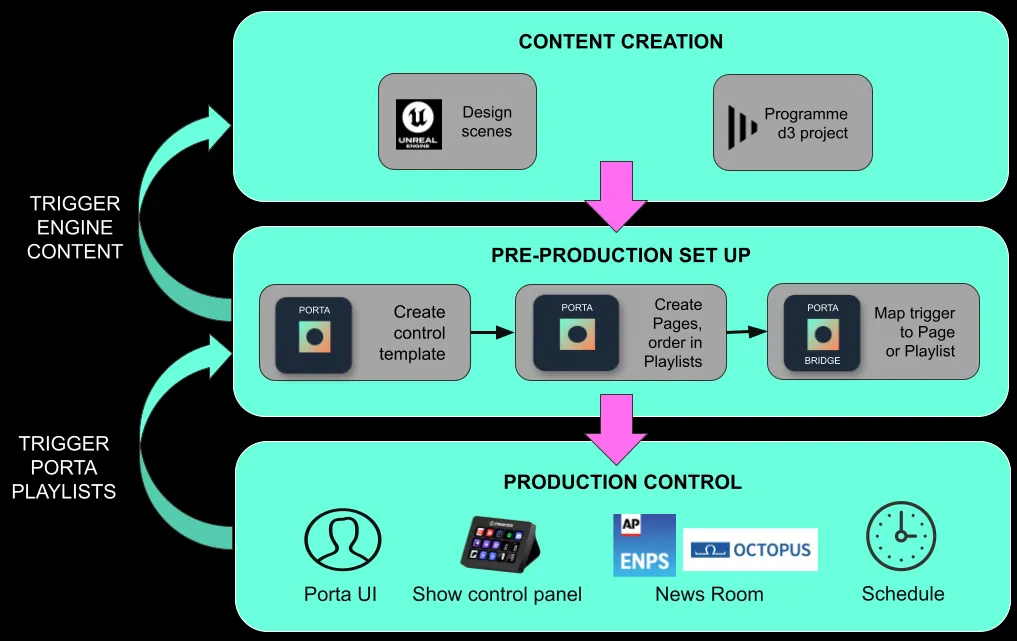
Porta simplifies production control by enabling different roles and stages of the production lifecycle to concentrate on their own specialities:
- Content Creation: This is typically done by an Unreal Engine artist or d3 Programmer, designing the scenes in Unreal Engine or programming the d3 project, and in both cases, then exposing the parameters and content to be adjusted at show time by external systems.
- Pre-production Set Up: The technical production operator uses Porta to create templates, playlists and pages in line with the show requirements.
- Production Control: During live operation, templated content is triggered by the appropriate control system. In a news broadcast, this is typically a News Room Computer System (NRCS); for a live event or stadium environment, this is typically a production switcher or show control panel. Alternatively, triggers can be configured according to date and time rules, or triggered manually using the Porta web interface.
Porta documentation
Section titled “Porta documentation”New to Porta, or arrived here from an older link? The documentation is organised into the areas below. Each area also appears in the sidebar.
Control Designer
Section titled “Control Designer”Connect Porta to Designer and drive content on the d3 timeline.
- Porta Bridge — establish the connection between Porta and Designer.
- Timeline Control and HTTP Sockpuppet — trigger and control Designer playback.
Control Unreal Engine
Section titled “Control Unreal Engine”Connect Porta to Unreal Engine and trigger templated scenes.
- Plugins — install and connect the Porta plugins.
- Unreal Integration and Unreal Motion Design.
Working with Porta
Section titled “Working with Porta”Day-to-day operation: building templates, pages and playlists, then driving them.
- Getting started: Find Channel, Make Template, Make Page, Use Playlist.
- Interface reference: Workspace, Settings, Media and Media Manager, Projects, Page Editor and Page Preview. The rest of the interface pages are listed under this section in the sidebar.
Data integration
Section titled “Data integration”- Google API Integration — drive page content from an external data source.
Control integration
Section titled “Control integration”Trigger Porta from broadcast and show-control systems.
Deployment
Section titled “Deployment”- Porta Cloud — cloud-hosted deployment.
- Porta On Prem (Porta VM): overview, setup and the troubleshooting guides in the sidebar.
Releases
Section titled “Releases”- Release notes index — what changed in each Porta version.