

APIs Overview
In Designer version r21, we introduced the ability to perform a number of controls from an API.
In Designer version r23.2, we released new APIs. With the release, we launched a new documentation portal specifically detailing our new suite of APIs.
Since the first release of our APIs, we have added new ones and updated existing ones. You can find the Designer APIs, RenderStream SDK, SMC API and others documented on the Developer Portal.
What is an API?
Section titled “What is an API?”An API (Application Programming Interface) is a set of rules and protocols that allows one software application to interact with another. It defines the methods and data formats that programmes can use to request and exchange information. Essentially, an API serves as a bridge that allows different software systems to communicate with each other.
Disguise’s APIs are used to make calls to Designer from an external, virtual, or actual physical interface to Designer projects to trigger a change or event. To make the call command, users must provide references to specific existing Designer projects and items within those. This is done by referencing the Unique Identifier (UID) for the object you want to interact with.
The Disguise approach to APIs
Section titled “The Disguise approach to APIs”The Developer Portal supports the control and monitoring of Disguise media servers and Designer software using a comprehensive HTTP API.
An HTTP API is an API that uses Hypertext Transfer Protocol as the communication protocol between the two systems. HTTP APIs expose endpoints as API gateways for HTTP requests to have access to a server. Disguise APIs typically use GET requests to retrieve information and POST requests to modify data or execute actions.
Workflow Centric
Section titled “Workflow Centric”APIs and SDKs designed to compliment and integrate with Disguise workflows.
Developer Focused
Section titled “Developer Focused”The developer portal has been designed with the developer experience in mind.
Integration Support
Section titled “Integration Support”We are happy to support integrations with our products. Contact us at integrations@disguise.one for integration support and partnerships.
d3Manager OpenAPI Documentation
Section titled “d3Manager OpenAPI Documentation”Documentation for our Disguise Designer APIs is also hosted within Designer.
To access API documentation from d3Manager navigate to Help > Open API Documentation.
Note that this documentation uses the OpenAPI format which means that you can execute APIs from within the documentation.
Opening API Documentation
Section titled “Opening API Documentation”Designer uses an OpenAPI format (Swagger Docs) for the d3 API.
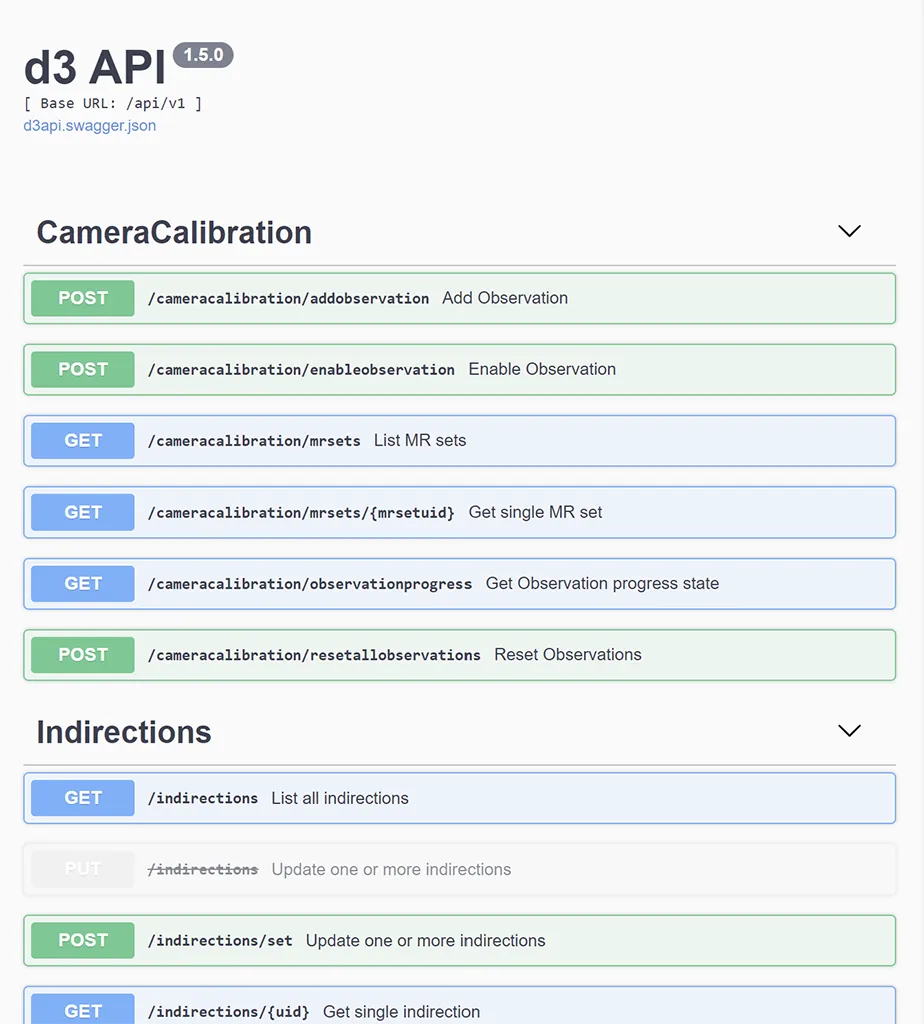
To access the API, open d3Manager, click Help, and select Open API Documentation.

Configuring API
Section titled “Configuring API”By default the API uses TCP Port 80. This can be can be changed in d3Manager.
- Open d3Manager.
- Select Machine Settings > Advanced Network Configuration.
- Change the port specified under API http port.
To disable the API entirely, so no ports are open. Set the port to 0.
What is a UID?
Section titled “What is a UID?”A unique identifier (UID) is a numeric or alphanumeric string that is associated with a single entity within a given system.
Every item in Designer has a numeric UID assigned to it. API GET requests typically return a Locator that contains the UID and filename of an object. The UID can be used in many POST requests to uniquely identify the object that should be modified.
A UID is specified as a string containing either a decimal or hexadecimal number. For example, the following query excerpts refer to the same object:
"uid" : "2276480868532234653""uid" : "0x1F97AF49E2D6299D"
For more information, please see Locator on the Disguise Developer Portal.
Disguise Developer Portal Links
Section titled “Disguise Developer Portal Links”For additional information on APIs, please visit https://developer.disguise.one where we cover the following topics: