

Riedel MediorNet Matrix Setup
In Designer, the Riedel MediorNet device can be configured to communicate with MediorNet systems for routing and management.
Riedel MediorNet is a real-time media network platform that transports and routes broadcast-quality video, audio, and data signals over a fibre-based infrastructure. It is used in broadcast facilities, stadiums, and live events to create a unified and flexible signal backbone, simplifying signal management and reducing the need for external processing devices. The system is modular and scalable, with a decentralised approach that provides redundancy and low latency.
Setting up a Riedel MediorNet device
Section titled “Setting up a Riedel MediorNet device”Prerequisites
Section titled “Prerequisites”This topic assumes you have already configured the matrix via the Riedel web interface. It is important to enable the Ember+ 3rd Party interface and assign IDs to the inputs and outputs, as these will be the indices used in Designer. Remember to do both Directions, In and Out. For more information, refer to the Riedel Matrix documentation.
There is a known limitation where only video channel connections can be modified.
Create the Riedel MediorNet device
Section titled “Create the Riedel MediorNet device”- In Designer, create a MediorNet Matrix device. A Riedel MediorNet device is created in the same way as any other device type. Please see Creating devices for step-by-step instructions on how to create a device, and select MediorNet Matrix from the menu of different device types. This will open the MediorNet Matrix device editor.
Configure TCP-IP control
Section titled “Configure TCP-IP control”- Configure the MediorNet Matrix to the same IP range as the Director/Actor network.
- Configure the device using the properties contained in the MediorNet Matrix device editor.
MediorNet Matrix device properties
Section titled “MediorNet Matrix device properties”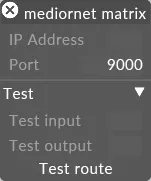
MediorNet Matrix device editor
IP address
Section titled “IP address”
The IP address of the matrix.
The TCP port to send commands on. The Ember+ protocol uses port 9000 by default.
Test input
Section titled “Test input”
The test input number.
Test output
Section titled “Test output”
The test output number.