

DMX Machine Control Device
The DMXMachineControl Device allows restart and shutdown commands to be sent to Designer from an external DMX device, such as a lighting console.
The DMXMachineControl Device is used for remote shutdown and restart of Disguise machines using DMX commands.
- Create a DMX device from the Device Manager. See Creating Devices for more detailed information.
- Create a DMXMachineControl Device.
- Set the Universe and Channel values.
- Configure the command and personality ranges to suit personal preference, or use the default settings.
- Export the personality to the lighting console in either .txt, GDTF or MA2 XML format from the Export tab of the device.
- The exports will be written to the output folder of the project folder.
- Send values from the lighting console to remotely trigger a machine restart or shutdown.
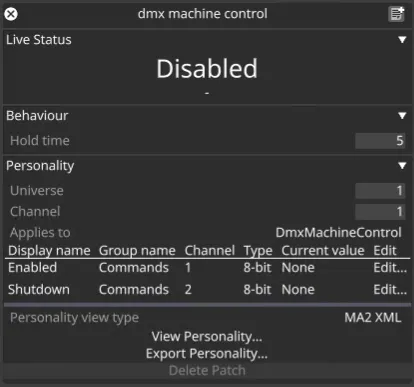
Live Status
Section titled “Live Status”Monitors the status of DMX commands being received.
Behaviour
Section titled “Behaviour”Hold Time
Section titled “Hold Time”The Hold time, specified in seconds, defines how long Designer will wait before acting on a Restart or Shutdown command.
Personality
Section titled “Personality”Universe
Section titled “Universe”The Universe property defines the Universe number that the commands will come from.
Channel
Section titled “Channel”The Channel property defines the Channel number that the commands will come from.
Enable Channel
Section titled “Enable Channel”The Enable channel defines which DMX channel will send the Enable command to the Disguise machine — this allows the command to be triggered. The enabled range can be viewed and edited by clicking on the Edit… button on the Enabled row.
Shutdown Channel
Section titled “Shutdown Channel”The Shutdown channel defines which DMX channel will send the shutdown command to the Disguise machine. The Idle, Restart, and Shutdown ranges can be viewed and edited by clicking on the Edit… button on the Shutdown row.
Personality view type
Section titled “Personality view type”Here, we can select whether to view and export the personality as a GDTF file, a text-formatted chart, or a (deprecated by MA) MA2 XML file.
View Personality
Section titled “View Personality”Opens a window displaying the personality with the chosen Personality view type.
Export Personality
Section titled “Export Personality”Exports the personality as a file with the chosen Personality view type.