

Telnet Device
TelnetDevice sends commands to 3rd party products over a TCP network connection using the Telnet protocol — typically on port 23. It is used to remotely control hardware that exposes a text-based command interface.
TelnetDevices are used by the Control Layer and the Matrix Control layer.
Creating a Telnet Device
Section titled “Creating a Telnet Device”A TelnetDevice is created in the same way as any other device type. Please see the earlier sub-chapter Creating devices for step-by-step instructions on how to create a device. This will open the TelnetDevice editor (explained below).
Telnet Device properties
Section titled “Telnet Device properties”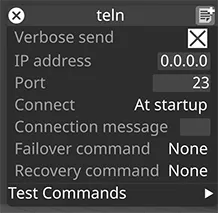
Verbose send
Section titled “Verbose send”When enabled, the device logs every message sent over Telnet to the console. This option is intended for debugging and troubleshooting only. We recommend disabling it for devices that send messages frequently, as it can generate excessive console output.
IP address
Section titled “IP address”The IP address of the destination 3rd party hardware. You must ensure that your network topology is configured to allow communications between the two machines.
The network port of the destination 3rd party hardware. Telnet is traditionally port 23.
Connect
Section titled “Connect”The Telnet port can be opened once At startup of Designer and held open or can be opened for Every send of a command.
Connection message
Section titled “Connection message”A message sent when the Telnet connection is established. Leave blank to disable.
Failover command
Section titled “Failover command”A control string sent to the device over Telnet when failover is triggered.
Recovery command
Section titled “Recovery command”A control string sent to the device over Telnet when failover recovery is triggered.
Test Commands
Section titled “Test Commands”The following Test Commands are available:
- Send Failover
- Send Recovery