

OSC Machine Control Setup
The OSCMachineControl device allows restart and shutdown commands to be sent to Designer from an external OSC device.
This topic outlines the setup steps for the OSCMachineControl device, which is used for remote failover and restore of machines using OSC commands.
Setting up OSC Machine Control
Section titled “Setting up OSC Machine Control”- Create an OSC device from the device manager — see OSC Device for details.
- Create an OSCMachineControl device from the device manager.
- Set the OSC device to an existing OSC device (or create a new one).
- Configure the input and output message strings to your preferences, or use the default strings.
- The exports will be written to the output folder of the project folder.
- Send values from the OSC device to remotely trigger a machine restart or shutdown.
OSC Machine Control properties
Section titled “OSC Machine Control properties”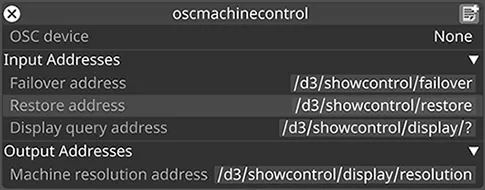
OSC Device
Section titled “OSC Device”Defines the OSC device that the commands will be sent to and from.
Input Addresses
Section titled “Input Addresses”Failover address
Section titled “Failover address”Causes a machine failover. Accepts a string parameter — the machine host name that should be failed over.
Restore address
Section titled “Restore address”Restores a machine from failover. Accepts a string parameter — the machine host name that should be restored.
Display query address
Section titled “Display query address”The string used to query display resolutions using the machine name.
Output Addresses
Section titled “Output Addresses”Machine resolution address
Section titled “Machine resolution address”The string used to define the response to the Display query, with two integer values for x and y resolution. For example:
/d3/showcontrol/display/resolution/myMachine/0/0 1920 1080