

Position Receiver Device
The Position Receiver device receives real-time positional data for tracking objects or performers.
Creating a Position Receiver Device
Section titled “Creating a Position Receiver Device”A Position Receiver Device is created in the same way as any other device type.
See Creating Devices for step-by-step instructions on how to create a device, then select PositionReceiver from the menu of different device types. This will open the editor (explained below).
Position Receiver Device properties
Section titled “Position Receiver Device properties”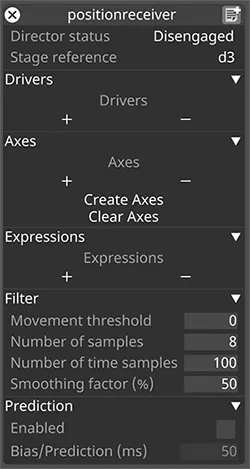
Director Status
Section titled “Director Status”Toggles whether the device is active — Engaged or Disengaged.
Stage Reference
Section titled “Stage Reference”Sets the frame of reference for the incoming data, such as d3.
Drivers
Section titled “Drivers”The object that decodes the data sent from the motion control system. Most of the time a driver is bespoke to a particular system.
See Position Drivers for more information on the types of position drivers supported by Designer.
A list of objects that control the movement of individual objects along each axis. Includes Create Axes and Clear Axes controls.
Expressions
Section titled “Expressions”A list of PositionAxisExpression objects. An AxisExpression object evaluates the data from the PositionAxis objects using an arithmetic expression and sends the result to the objects.
For example:
((Axis A + Axis B) @/ 2)Filter
Section titled “Filter”- Movement threshold — minimum change needed before updating the output value. Helps when data has unwanted movement when intended to be static.
0disables the threshold. - Number of Samples — number of position samples to filter.
- Number of Time Samples — number of time samples to filter.
- Smoothing Factor — smooths the data. Use caution when setting higher values as this can increase latency.
Prediction
Section titled “Prediction”- Enabled — used to predict tracked positions at a later time.
- Bias/Prediction (ms) — compensates for time latency between received data and projector output.
For information on configuring a tracking source, see Tracking Source.